Dot Source Code Blocks in Org Mode
Org Mode support for Dot

Introduction
Dot is one of six layout programs in the Graphviz open source
graph visualization software, created at AT&T. The Graphviz layout
programs take simple text graph descriptions and make useful diagrams
in a variety of formats. Dot source code blocks call the dot
layout program by default, but can be configured to call any of the
other five Graphviz layout programs.
Graph visualization has applications in many technical domains, where
it is often used to explore large data sets. A typical use in Org
mode chains the dot source code block to a source code block in
another language that is responsible for converting a data table into
source code for one of the Graphviz layout languages.
Requirements and Setup
Graphviz is distributed on an open source basis under The Eclipse
Public License. Executable packages from AT&T are available for
Linux, Solaris, Windows, and Mac.
You can configure Org mode to execute dot source code blocks by
adding a line to org-babel-load-languages:
(org-babel-do-load-languages
 'org-babel-load-languages
 '((dot . t))) ; this line activates dot
Optionally, graphviz-dot-mode offers font locking, indentation, and
preview of graphs. The variable org-src-lang-modes can be customized
to contain an entry that associates dot files with
graphviz-dot-mode.
Org Mode Features for Dot Source Code Blocks
Header Arguments
Dot code blocks produce graphics files. The default value for
the results header argument is file and for the exports header
argument it is results.
There are two dot specific header arguments that can be used to
tailor the command line. They are:
cmd- this header argument can be used to change the layout program from the default "dot". Sensible values are "neato", "fdp", "sfdp", "twopi", and "circo".
cmdline- the default sets the
dotflag-Tto the extension of the output file in order to indicate the output format.Graphvizrecognizes three dozen output formats. Other flags that can be set with:cmdlinecontrol default graph, node, and edge attributes, among other functionality.
The :file header argument is required for dot source code blocks.
Note that dot code blocks currently do not evaluate variables. If
you want to pass variables to dot, then you have two options. You
can use dot as one link in a source code block chain and pass
variables to a source code block in another language responsible for
returning valid dot code, as in the example below. Or, you can use
the header argument cmdline to set graph, node, and edge attributes.
Sessions
Dot does not support sessions.
Result Types
Dot source code blocks produce graphic files, so the default value
file is the only sensible type of result.
Examples of Use
A typical use of a dot source code block is to produce a graph
visualization of a data set.
One way to do this is by chaining source code blocks. An example of
chaining source code blocks to produce a dot graph is provided by
Schulte et al. in A Multi-Language Computing Environment for Literate
Programming and Reproducible Research.
The following example of chaining uses the input table,
dot-eg-table, which has one column for node names and another column
for node labels. The table column names are optional in this case;
the chain does not require them.
#+name: dot-eg-table
| node | label  |
|------+--------|
| a    | Hello  |
| b    | World! |
The table, dot-eg-table, is passed to an emacs-lisp code block,
make-dot, that is responsible for producing valid dot code. Note
the variable, shape, which indicates the dot node shape. This is
a link in the example chain where you can set dot variables.
#+name: make-dot
#+BEGIN_SRC emacs-lisp :var table=dot-eg-table shape="box" :results output
  (mapcar #'(lambda (x)
              (princ (format "%s [label =\"%s\", shape = \"%s\"];\n"
                             (cl-first x) (cl-second x) shape))) table)
              (princ (format "%s -- %s;\n" (cl-first (cl-first table)) (cl-first (cl-second table))))
#+END_SRC
#+RESULTS: make-dot
: a [label ="Hello", shape = "box"];
: b [label ="World!", shape = "box"];
: a -- b;
The make-dot code block is chained to a dot code block that wraps
the input in a graph{} command. Note that the variable, input, is
not evaluated, but is simply inserted into the write-dot code block.
#+name: write-dot
#+BEGIN_SRC dot :file images/test-dot.png :var input=make-dot
graph {
 $input
}
#+END_SRC
Evaluating write-dot produces Figure 1.
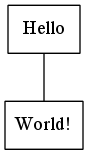
write-dot.
The following dot code block, write-dot-cmdline, uses the cmdline header argument to color node labels red (fig. 2). Note that the cmdline header argument overwrites the default value, which sets -T to the graphic file type based on the name passed to the file header argument.
#+name: write-dot-cmdline
#+BEGIN_SRC dot :file images/test-dot-cmdline.png :var input=make-dot :cmdline -Tpng -Nfontcolor=red
graph {
 $input
}
#+END_SRC
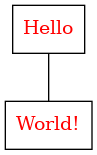
write-dot-cmdline with labels colored by a cmdline header argument.